
Unreal Engine 5 Stutter Isn't One Problem, It's At Least Three
Shader compilation, traversal streaming and expensive rendering features all cause stutter in Unreal Engine 5 games, but they have different causes, fixes and levels of developer blame.
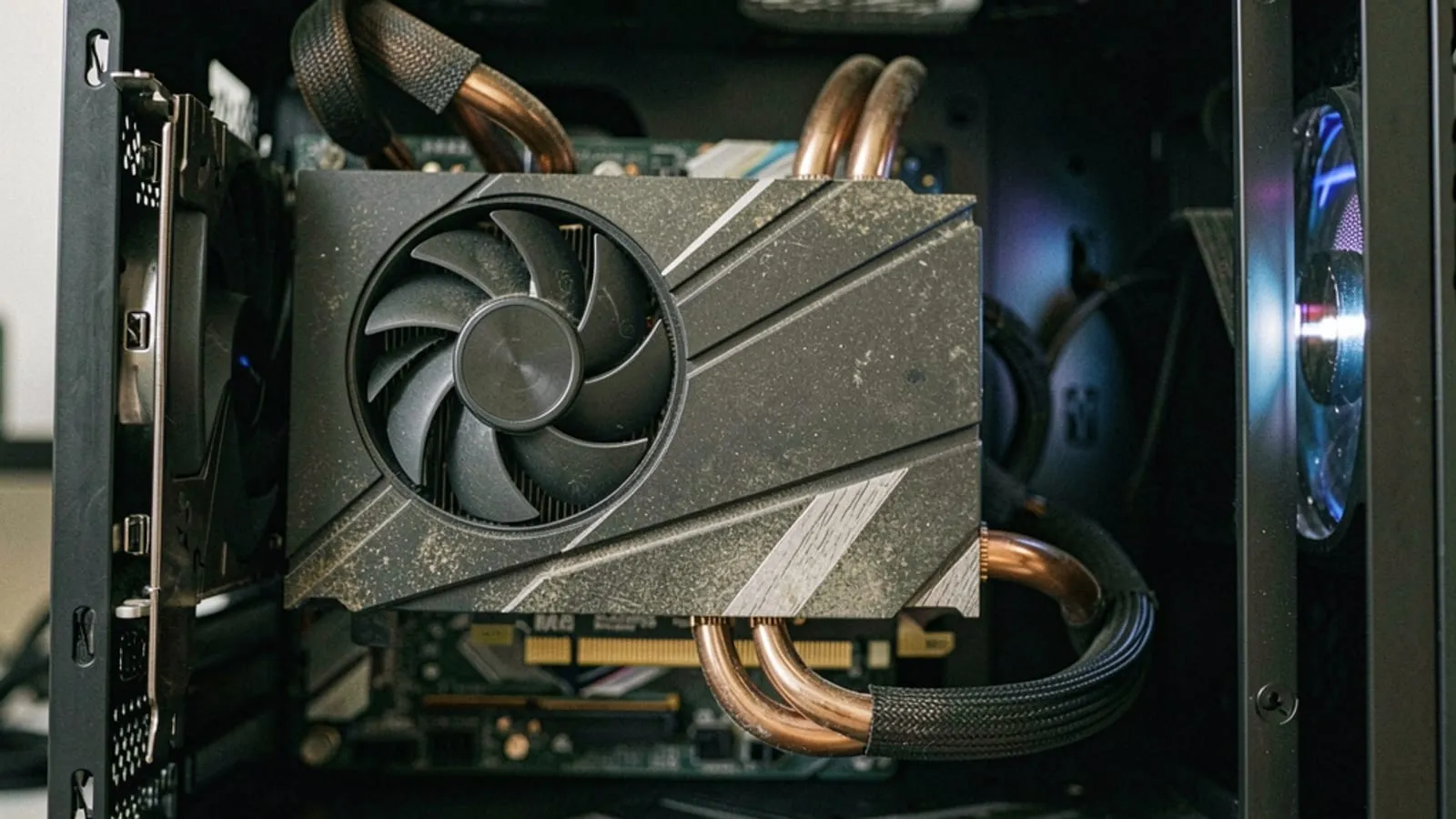
A PC Gamer hardware writer got Borderlands 4 to stop stuttering by digging into the Nvidia driver panel and raising the shader cache size to 100 GB. Not a graphics setting inside the game. A driver-level cache limit, cranked up to the size of a decent chunk of your SSD, just so the game would stop recompiling the same shaders over and over. His own words: “which feels like something I shouldn’t have to do in a well-optimised game.” He’s right. And he’s also, without meaning to, describing exactly why Unreal Engine 5 has a reputation problem that isn’t going away.
Here’s the thing though. “UE5 games stutter” is doing a lot of work as a sentence, and it’s hiding at least three completely different problems with different root causes, different fixes, and wildly different amounts of developer blame attached. Shader compilation stutter is not traversal stutter. Traversal stutter is not the cost of Lumen or Nanite or virtual shadow maps just being switched on. Lumping them together is how you end up with useless internet discourse where one camp says “lazy devs” and the other says “upgrade your PC,” and both are wrong often enough to be worthless as advice.
So let’s take them apart. If you can tell these three stutters apart by feel, you’ll know which ones are fixable on your end, which ones are the studio’s fault, and which ones you’re just stuck with until a patch or a new engine version arrives.
What a PSO actually is, and why DX11 used to hide this from you
Every time a UE5 game draws something on screen, whether it’s a character’s skin, a puddle reflecting the sky, or a particle effect, the GPU needs a compiled program that tells it exactly how to do that specific draw. In modern graphics APIs that compiled bundle is called a pipeline state object, or PSO. It bundles more than the shader code, it also carries the render target format, the blend mode, the vertex layout, the depth test settings and a pile of other state, all baked together into one object the GPU driver can execute without having to figure anything out on the fly.
Under DirectX 11, you mostly never thought about this, because the driver did the thinking for you. DX11 is a fairly abstract API. You’d hand it shader source and state changes and the driver would quietly translate, cache and often recompile things behind your back, in real time, using per-vendor driver logic that Nvidia and AMD had spent over a decade optimising. It wasn’t free. DX11 games could stutter too, plenty did. But a huge amount of the compilation complexity lived inside the driver, invisible to the game and invisible to you.
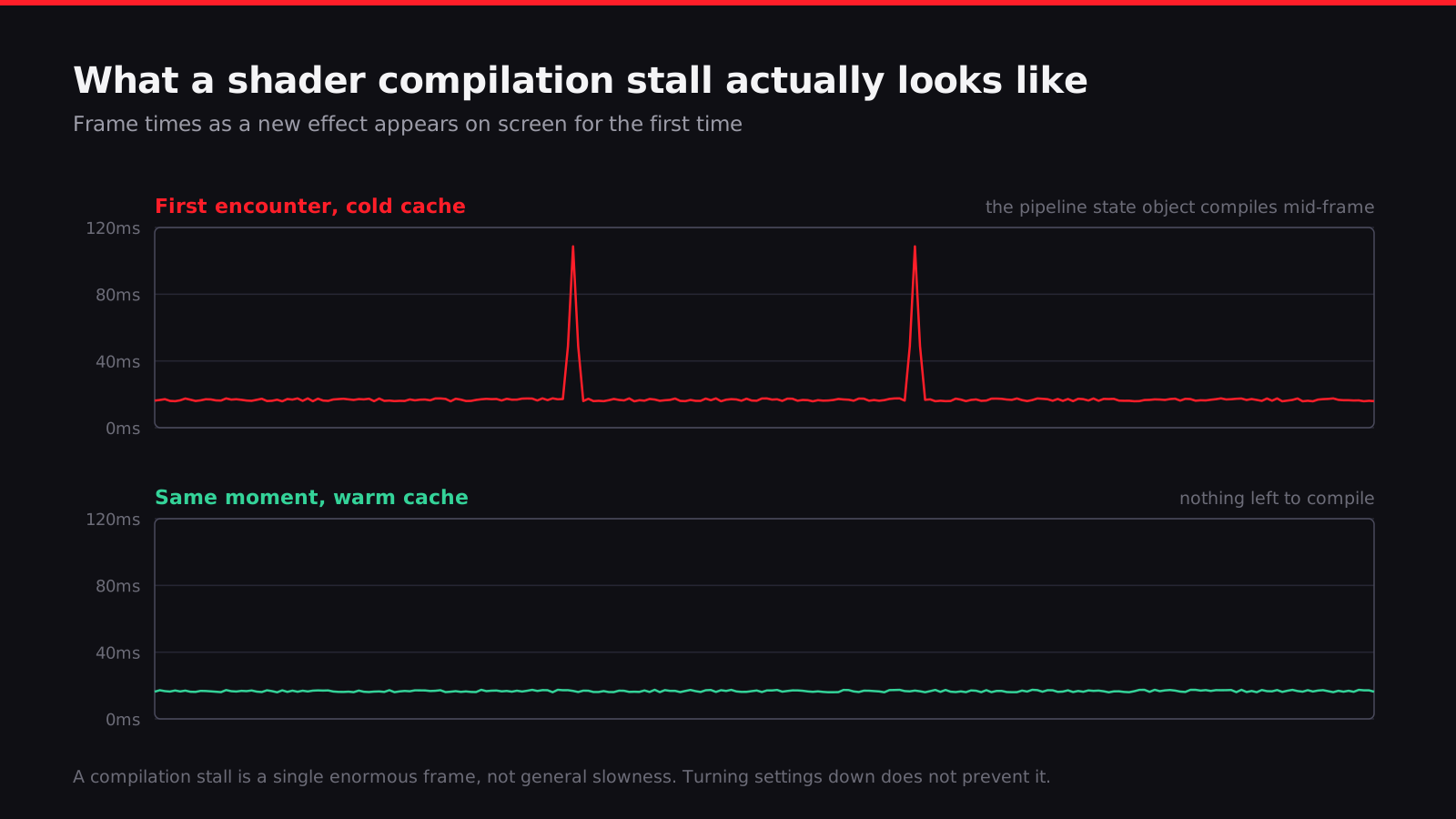
DX12 and Vulkan threw that model out. They’re explicit APIs, built on the idea that the game engine, not the driver, should own memory management, synchronization and pipeline state, because that gives engines the chance to be dramatically more efficient if they do it well. The tradeoff is that PSO compilation moved from “the driver’s problem” to “the game’s problem.” When a UE5 game needs a PSO it hasn’t compiled yet, it now has to compile it itself, right there, on your machine, in real time, and that compilation is not instant. Multiply that by the sheer number of unique material and pass combinations a modern Unreal game ships with and you get the exact freeze you’ve felt: everything’s running fine, a new material or effect appears on screen for the first time, and the frame time spikes hard for a fraction of a second while the game compiles the PSO it needed.
That’s shader compilation stutter. It is, structurally, a byproduct of an API shift the whole industry chose to make because explicit APIs are better for performance in the long run. DX11’s abstraction was hiding cost, not eliminating it.
Why a “precompiling shaders” screen at launch is a symptom, not a fix
Plenty of UE5 games now show you a progress bar on first launch that says something like “compiling shaders” and takes anywhere from thirty seconds to several minutes. That looks like a solution. It is, honestly, more of an admission.
What that screen is doing is running through Epic’s PSO caching system, which lets a studio bundle a list of pipeline state objects the game is known to need and precompile them up front instead of hitting them for the first time mid-gameplay. Good, in principle. The problem is that the list can only ever be as complete as the studio’s own testing managed to make it, and building a genuinely complete cache means actually playing the entire game, on every graphics preset, across a representative spread of GPU vendors and driver versions, and logging every single PSO that gets touched along the way. That is a huge amount of QA time on a system that’s invisible if it works and produces angry Steam reviews if it doesn’t. It’s the kind of unglamorous coverage work that gets cut when a schedule slips, because nobody in a trailer ever points at a shader cache.
So when a precompile screen finishes and you still stutter twenty minutes into a level you haven’t been to before, that’s not a bug in the precompile system. That’s the cache telling you, honestly, that it doesn’t contain the PSO you just needed. The upfront screen bought you coverage for the common path. It didn’t buy you coverage for everything.
Worth knowing too: a PSO cache built and shipped by the studio is tied to your specific GPU architecture and driver behaviour, not just the game version. That’s part of why “I compiled shaders at launch and it still stutters” is a completely normal thing to experience, and why a driver update can reintroduce stutter that a patch had already fixed. The cache you built yesterday can go stale the moment Nvidia or AMD ships a new driver.
Borderlands 4 is the case study everyone should look at here, because Gearbox actually documented the failure mode in public without meaning to. The game launched to “Mostly Negative” on Steam despite pulling in over 192,000 concurrent players, and stutter and crashes were a huge part of that. Then on 18 September 2025, a week after launch, Gearbox shipped a performance patch, and it triggered a fresh wave of stuttering complaints. Their explanation was that the new stutter “should resolve over time as the shaders continue to compile.” Read that sentence again. That’s a studio confirming, in their own words, that the fix for a stutter problem is time spent letting the game compile shaders on your machine, after a patch had just invalidated whatever cache you’d built up. It’s not malicious. It’s just an honest description of how brittle this whole system is once you’re relying on a shipped cache rather than genuinely eliminating first-encounter compilation.
Traversal stutter is a completely different animal
This is where people get the diagnosis wrong constantly, because both problems present as “the game freezes for a second.” Traversal stutter has nothing to do with shaders. It’s caused by the game’s streaming systems failing to keep up with how fast you’re moving through the world.
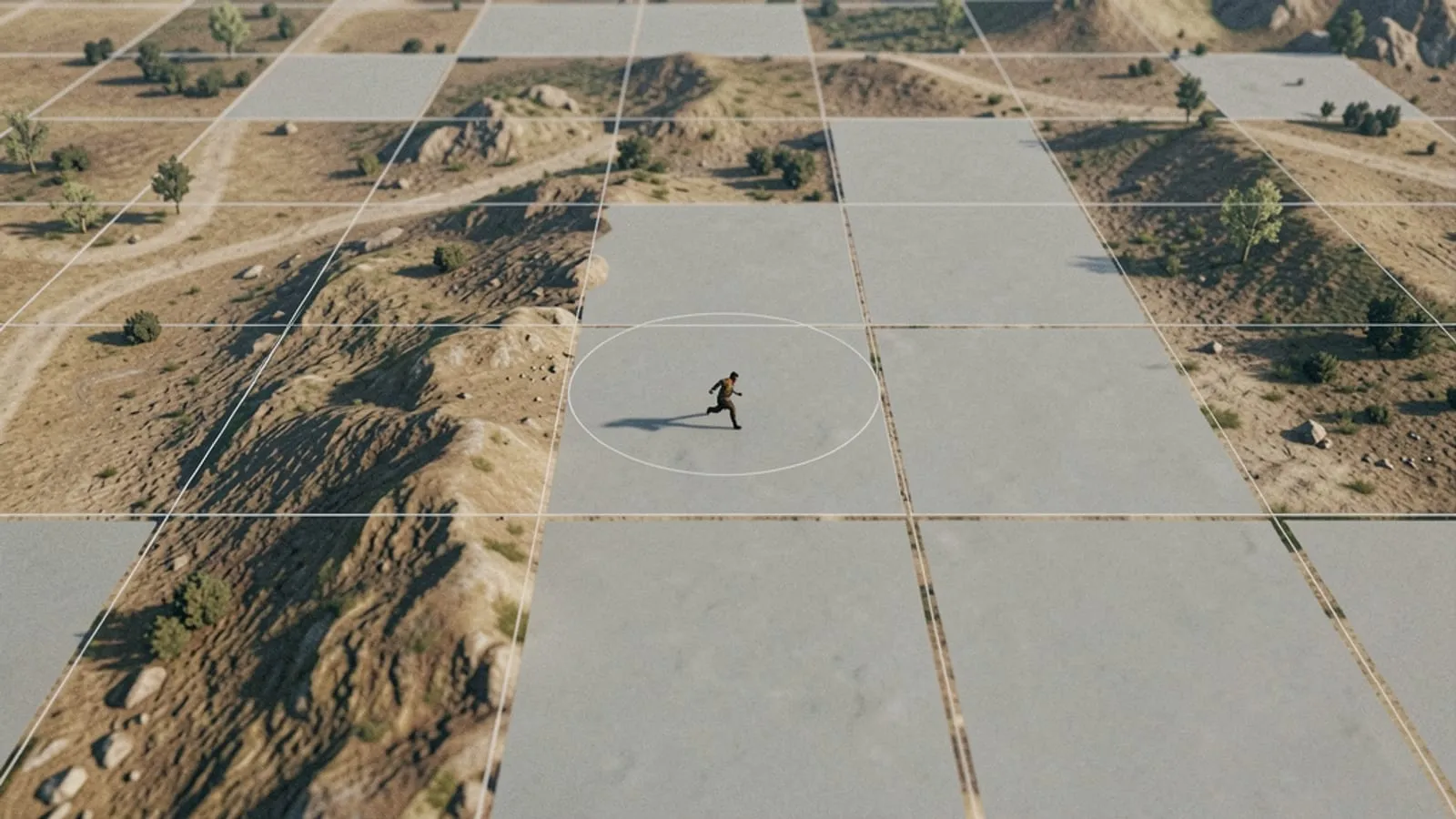
UE5’s World Partition system divides an open world into a grid of cells, and streams those cells in and out based on your position, loading meshes, textures, collision data and lighting information for the area you’re approaching while unloading what’s behind you. That streaming is supposed to happen asynchronously, on background threads, well ahead of when you actually need the data, so you never notice it. When it works, you don’t. When it doesn’t, the game thread ends up blocking on work that should have stayed off it entirely, whether that’s decompressing an asset, finalizing a texture upload, or waiting on a disk read that took longer than the streaming system budgeted for.
The tell that separates this from shader stutter is simple and pretty reliable: traversal stutter survives a warm shader cache. You can precompile every PSO in the game, sit on a fully warmed cache built over dozens of hours of play, and still get a hitch every time you sprint through a specific stretch of open world, because the hitch was never about compiling anything. It’s about how much data has to move and how fast, and that scales with how quickly you’re covering ground. Fast travel, vehicles, and mantling systems that let you cover a lot of distance in a hurry are the worst offenders, because they can outrun the streaming budget the developers tuned around normal walking or running speed.
This is also why traversal stutter correlates so strongly with fast storage. An NVMe SSD with high sustained read speeds gives the streaming system more headroom before it falls behind. A slower SATA SSD or, god forbid, a spinning hard drive, and you’re much more likely to outrun what the disk can hand over. It’s one of the few UE5 stutter categories where “just buy a faster drive” is genuinely good advice rather than a dodge.
The cost of the marquee features, and where they stop paying for themselves
Even with a perfectly warm shader cache and no traversal issues at all, UE5 games ask a lot of your GPU, because the engine’s headline features are genuinely expensive and Epic’s defaults don’t always match what a given scene needs.
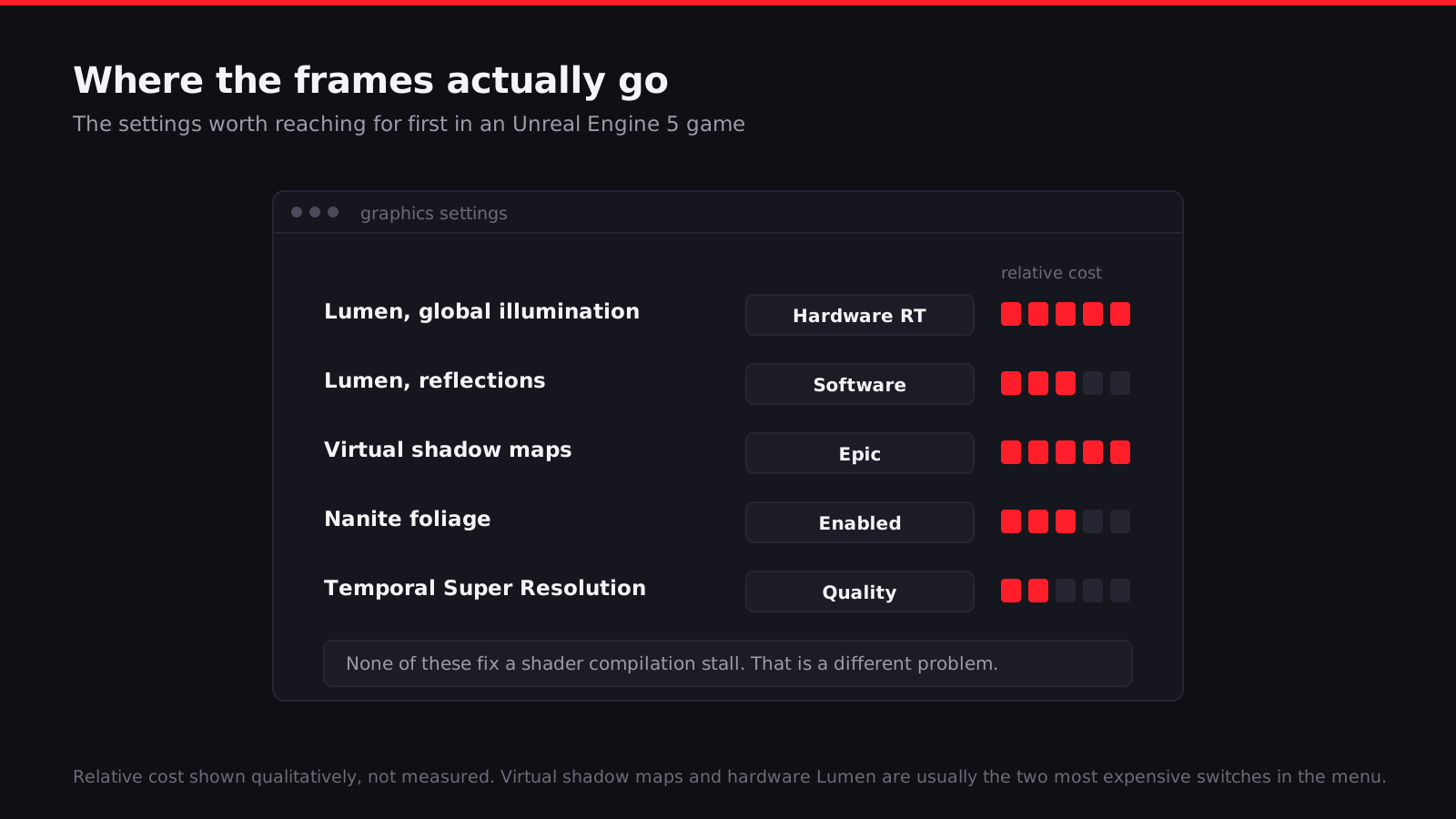
Lumen is Epic’s dynamic global illumination and reflections system, and it comes in two flavours. Software Lumen traces through a scene representation built from signed distance fields and a mesh distance field, and it’s the mode most consoles and a lot of mid-range PCs run. Hardware Lumen instead traces rays against the actual geometry using ray tracing acceleration structures on your GPU, which looks noticeably more accurate, especially for fine detail and reflections, but costs meaningfully more because it depends on ray tracing hardware doing real work every frame rather than approximating against a coarser field. If you’re on a GPU without strong RT hardware, or one from a generation where RT performance is still the weak link, Hardware Lumen is usually the first thing I’d turn off. Software Lumen looks close enough in a lot of scenes that the difference isn’t worth the frame time.
Nanite gets misunderstood a lot. It’s a virtualized geometry system that lets artists throw absurdly high-poly meshes into a scene without the traditional cost of rendering all those triangles, because Nanite clusters geometry and only rasterizes the detail that’s actually visible at the current resolution and distance, using its own software rasterizer for small triangles instead of the GPU’s fixed function hardware. What it solves is genuinely impressive: level of detail management basically disappears as a manual art problem, and scenes can carry film-quality rock and rubble meshes without the polygon count killing you. But it isn’t free, and it isn’t a universal win. Nanite has a fixed baseline overhead per scene for cluster culling and visibility buffer work, so a very simple, low-poly scene can actually run worse under Nanite than it would with traditional rendering, because you’re paying Nanite’s setup cost for detail you didn’t need. And it has real trouble with thin, dense, heavily overlapping geometry, which is exactly what foliage is: masses of small overlapping leaf and branch clusters that don’t cluster efficiently and can end up costing more through Nanite than a well-tuned traditional LOD system would. A lot of UE5 games still render foliage outside Nanite for this exact reason.
Virtual shadow maps are, in my experience, frequently the single most expensive individual setting in a UE5 game’s menu, and they’re easy to overlook because they don’t have flashy marketing behind them the way Lumen and Nanite do. VSMs page shadow map detail similarly to how virtual texturing pages textures, caching pages and only updating the ones that changed, which in theory should be efficient. In practice, dynamic lights, moving foliage and dynamic shadows from Nanite geometry all force page invalidation and recomputation constantly, and that cost adds up fast, especially at higher shadow resolution settings or with a lot of shadow-casting dynamic lights in a scene. If your frame rate is disappointing and you haven’t touched the shadow quality slider yet, that’s usually where I’d look before touching anything else.
Temporal Super Resolution, Epic’s built-in upscaler, is genuinely one of the better parts of this whole picture. It reconstructs a higher resolution image from a lower internal render resolution using temporal accumulation across frames, and it’s usually good enough that running at a lower internal resolution with TSR on looks better than just rendering natively at that lower resolution would. It’s not magic, ghosting and disocclusion artefacts on fast motion are a real limitation, but as a lever for clawing back frame rate it’s one of the least destructive ones available.
| Setting | Roughly what it costs |
|---|---|
| Lumen, Software mode | Moderate, scales with scene complexity and bounce count |
| Lumen, Hardware ray tracing mode | High, depends heavily on your GPU’s RT hardware generation |
| Nanite | Low to moderate for dense detailed geometry, can be a net loss on simple scenes or dense foliage |
| Virtual shadow maps | High, often the most expensive single toggle in the menu |
| TSR / upscaling | Saves performance by rendering below native resolution, cost depends on the quality preset chosen |
If I had to give one piece of settings advice, it’s this: check shadow quality and Lumen’s ray tracing mode before you touch resolution scale. Turning resolution down fixes symptoms. Turning down virtual shadow map resolution or dropping from Hardware to Software Lumen actually removes work the GPU was doing.
Why reviewers sometimes don’t see what you see
This is the part that fuels a lot of the “reviewers are paid off” conspiracy nonsense online, and the real explanation is much more boring and much more structural.
Reviewers frequently play on pre-release builds that are ahead of the day-one patch, sometimes weeks ahead, and those builds can behave very differently from what ships to the public, for better or worse. Review sessions also tend to happen on high-end hardware, because outlets need machines capable of running everything at max settings for screenshots and video capture, and high-end GPUs have more headroom to absorb a shader compilation hitch that would flatten a mid-range card. And critically, a lot of review playtime accumulates a warm shader cache over the review period, the same way yours does over your first few hours, except the reviewer’s clock started before yours and their build may have shipped with a healthier cache to begin with because the studio prioritised review coverage during QA.
Then there’s the straightforward embargo problem. Borderlands 4 is a genuinely useful example here for a different reason than the shader cache story. PC Gamer’s editor Tyler Wilde said plainly that “2K Games provided early review copies of Borderlands 4 to a number of media outlets, but PC Gamer was offered access at launch only,” despite PC Gamer specifically flagging interest in testing the game’s unusually steep eight-core CPU minimum. The outlet most likely to actually dig into PC performance was the one denied early access, on a game where PC performance turned out to be the entire story. PC Gamer didn’t publish its verdict until 18 September, a week after launch. That’s not a conspiracy, it’s a publisher managing what gets tested before the public buys, and it happens to line reviewer conditions up even further away from what a day-one buyer experiences.
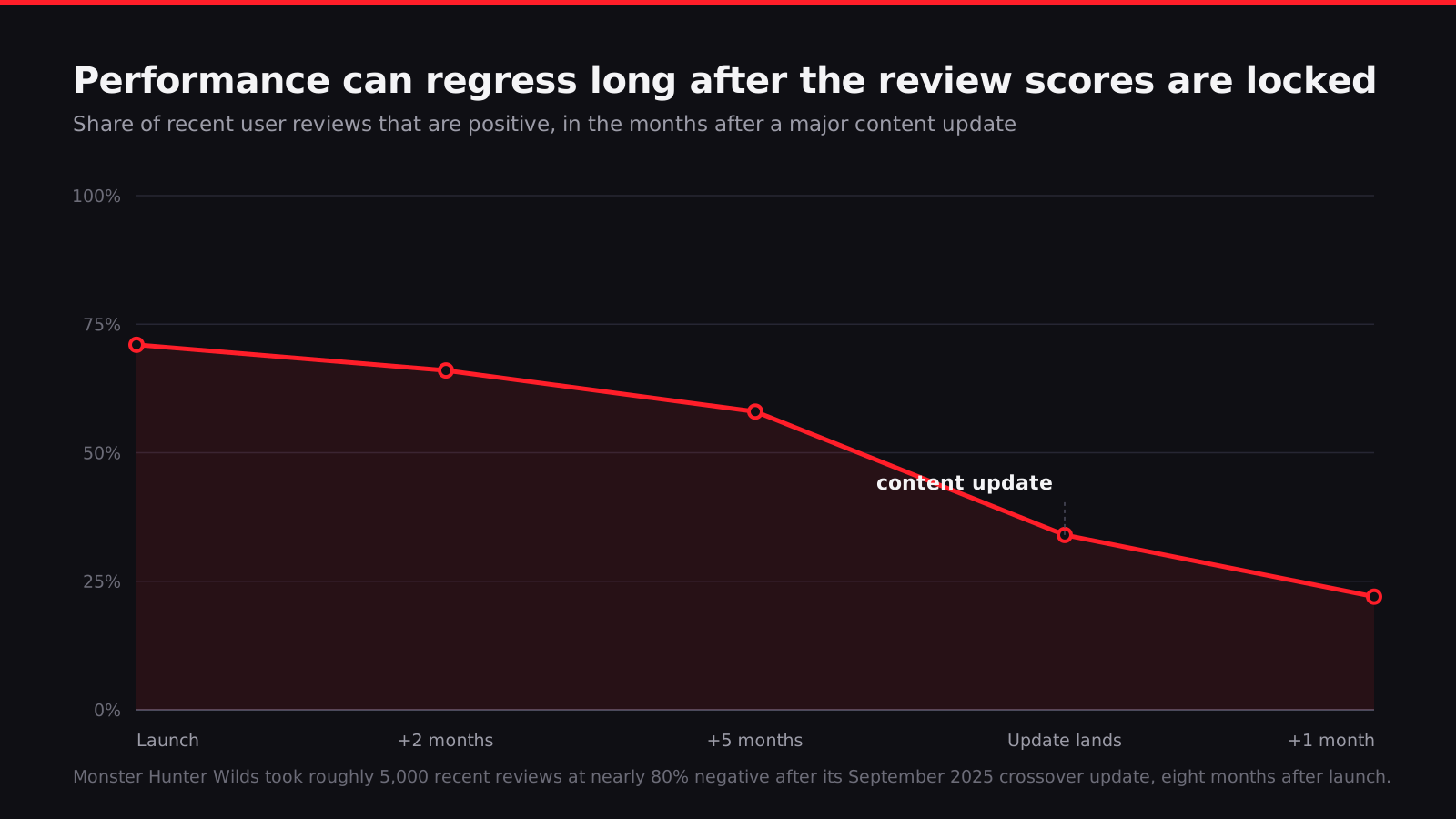
And then there’s the case that should worry people more than a rocky launch does: Monster Hunter Wilds, which didn’t stay bad, it got worse. It launched in February 2025 with the Steam Deck unable to hold 30 fps even on the lowest settings and an early “Mixed” rating. By June 2025 it was taking on more than 2,000 negative reviews in a single week. But the sharper data point is from eight months after launch. After the Final Fantasy XIV crossover update on 29 September 2025, roughly 5,000 recent reviews came in nearly 80% negative, dragging the overall rating back toward “Mixed” again, long after most people assume a game’s performance story is finished. One user running a 4090 and a 7950X3D, about as strong a PC as you can build, put it bluntly: “Every time the game gets updated my performance decreases… still crashing frequently.” That’s not a launch problem anymore. That’s a studio’s patch cadence actively working against its own performance, on hardware that has no business struggling with anything Capcom’s engine throws at it. Whatever review score you saw at launch tells you almost nothing about what the game runs like today, and I don’t think enough of the discourse accounts for that.
What you can actually do about it
None of this is entirely in your hands, but some of it genuinely is.
Let the shader compilation step finish, obviously, and if the game doesn’t have one built in, walk through a few different areas and combat scenarios early on rather than beelining the story, specifically to force PSO compilation to happen while you’re paying attention to it rather than mid-firefight later. It’s not a complete fix, as we’ve covered, but it’s not nothing either.
Cap your frame rate below what your system can actually sustain at peak. This sounds counterintuitive, giving up frame rate you technically have, but a hard cap set comfortably under your GPU’s ceiling leaves headroom for the game to absorb a compilation spike or a streaming hitch without it reading as a dropped frame you can feel. If your card can do 90 fps in open areas but dips to 60 during a stutter, capping to 72 means the dip has somewhere to land instead of falling straight off a cliff you were already standing on the edge of.
There’s a real argument for locking to a lower, rock-stable target instead of chasing your GPU’s max. A steady 60 with occasional dips to 55 feels dramatically better than a variable 45 to 90 that never sits still, even though the second one has a higher average. Consistency reads as smoothness to your brain in a way raw average frame rate doesn’t. The counterargument is that if you’ve paid for high-end hardware, capping low feels like leaving performance on the table you already own, and for competitive or fast-paced games the extra headroom genuinely matters for input latency. I don’t think there’s a universally correct answer here. It depends on what kind of game it is and what you personally notice.
If your display supports variable refresh rate, turn it on and don’t second-guess it. VRR exists specifically to smooth over frame time variance like this, syncing your display’s refresh to whatever the GPU delivers rather than forcing a fixed cadence, and it makes both shader stutter and traversal stutter noticeably less jarring even though it doesn’t reduce the underlying frame time spike at all.
Turning graphics settings down does not fix a compilation stall, and this trips people up constantly. Dropping from Epic to Medium reduces the ongoing rendering cost per frame, which is a completely different thing from the one-time cost of compiling a PSO the first time you encounter a new effect. You can run a game on the lowest possible settings and still get a hard stutter the first time you walk into a room with a shader combination you haven’t triggered yet, because the compile has to happen regardless of how simple the resulting frame is to render afterward.
On the driver side, both Nvidia and AMD let you raise the on-disk shader cache size limit in their control panels, and this is exactly the fix that worked for Borderlands 4. The driver caches compiled shaders across sessions so it doesn’t have to redo the same compilation work every time you launch, but the default cache size limit can be too small for a game shipping this many unique material and pass combinations, meaning the driver keeps evicting and recompiling shaders it already did the work for. Raising the limit, sometimes dramatically, gives the cache room to actually hold everything the game needs long term.
And the honest part, the part that’s easy to skip past: some of this you genuinely cannot fix. If a studio ships an incomplete PSO cache, or a streaming system tuned around a faster drive than yours, or a raytracing default that assumes hardware you don’t have, there is no control panel setting that undoes that decision. You can mitigate. You can cap frame rate, turn on VRR, raise a cache limit, and skip the worst individual settings. You cannot engineer your way to a fix a studio didn’t ship. That’s a genuinely frustrating thing to sit with as a player who’s done everything the checklist says to do and is still getting hitches.
What developers should actually be doing, and why they mostly aren’t
Here’s my actual opinion on all this, the one I think is defensible rather than just cathartic: Epic shipped a renderer whose defaults assume a level of per-project tuning that most studios simply do not have the schedule, budget or staffing to do properly, and the online discourse then turned around and blamed either lazy developers or players’ hardware, when the honest answer is that Epic built a very capable, very demanding toolkit and handed it to an industry that’s still, project by project, learning it costs more diligence than the marketing implied.
Building a genuinely complete PSO cache means QA time that has to be budgeted for explicitly, across settings presets and a spread of GPU generations, and that’s exactly the kind of unglamorous coverage work that a project under deadline pressure trims first, because it’s invisible when it works. Tuning World Partition streaming distances against realistic player movement speed, including whatever traversal ability lets you outrun the intended pace, is genuinely hard engineering work that needs iteration time most milestones don’t leave room for. And Lumen, Nanite and virtual shadow maps all ship with defaults tuned by Epic against Epic’s own demo content, not your specific game’s asset density, foliage count or lighting setup, which means every studio needs to actually go in and retune those defaults against their own scenes rather than trusting the out-of-box settings, and a lot of them just don’t, because it’s one more task competing against a hundred others before a fixed release date.
None of that erases studio accountability. Gearbox chose to ship Borderlands 4’s day-one patch after launch instead of before it, and chose to respond to legitimate performance complaints by telling players their hardware was the problem rather than owning the shader cache gap. That’s a choice, not an engine limitation. But I think the discourse would be a lot more useful if it separated “this studio made bad calls under deadline pressure with a genuinely demanding toolkit” from “this studio is lazy,” because those aren’t the same claim and they don’t call for the same fix. One is a scheduling and incentive problem the whole industry needs to solve. The other is just an insult that makes you feel better for about ten seconds and explains nothing.
I don’t think Epic is going to change the defaults in a way that fixes this on its own, because the defaults exist to make the engine look good in a vacuum demo, not in your specific 40-hour open world game. The fix has to come from studios treating shader cache completeness and streaming tuning as first-class, budgeted, non-negotiable line items rather than something you get to if time allows. Whether publishers are willing to hold a release date open long enough for that to actually happen is, I think, the real question nobody wants to answer honestly.
Read next
The bugs don't sink a broken launch. The apology does.
S.T.A.L.K.E.R. 2 shipped broken and became Game of the Year. Borderlands 4 shipped broken and lost its opening week. The difference was never the bug list.
Average FPS Is the Least Useful Number in Any Benchmark Chart
A practical guide to reading frame-time graphs, percentiles and latency so a benchmark chart tells you something true instead of something flattering.

The Steam Machine is the most principled console you probably shouldn't buy
Valve's six-inch cube costs $1,049 because Valve refuses to sell hardware below cost. Here is whether that principle, and the engineering behind it, justifies the money.